DAKboard: Smart Wall Calendar
- 0.0
- Rating
- 10.00K
- Installs
- Free
- Price

 Analysis by App-foxy
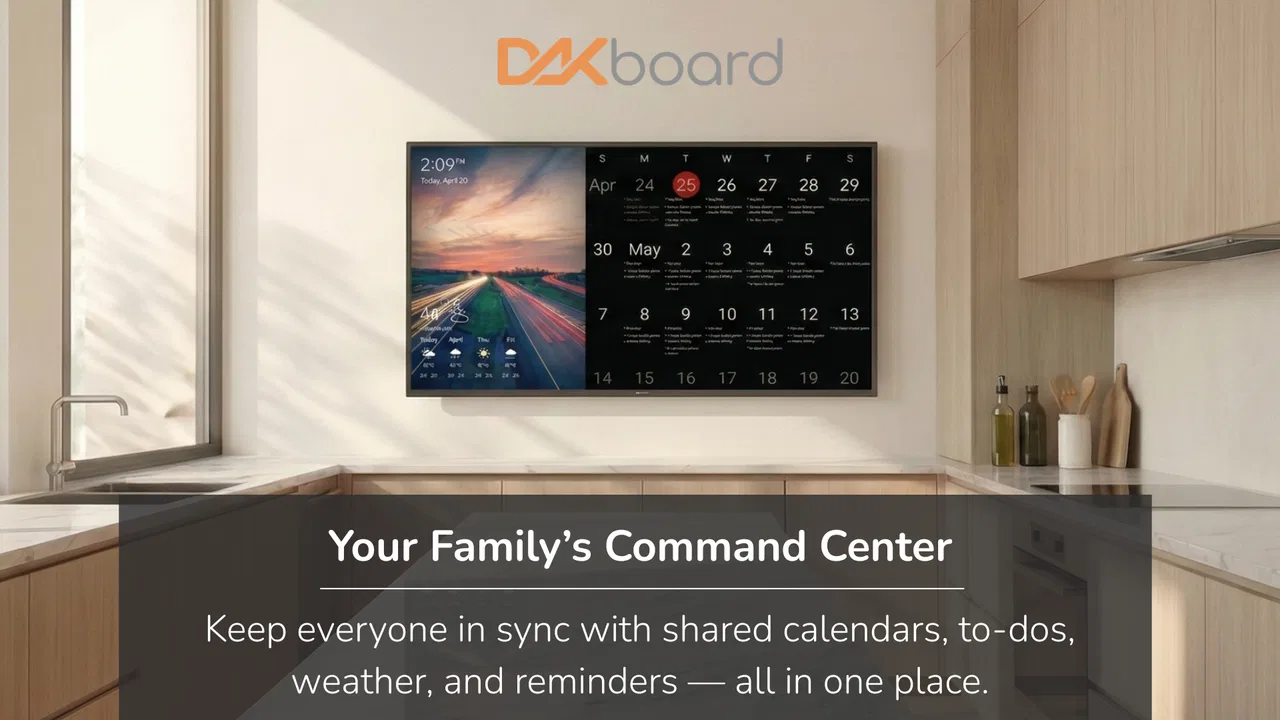
DAKboard: Smart Wall Calendar is the kind of app I would consider when a household needs one shared place to see what is happening. It sits in the House & Home category and comes from DAKboard, with a focus on turning a screen into a family-facing calendar, chore view, and smart home dashboard. That combination sounds simple, but it changes the question from “Which calendar should I install?” to “What information do I want everyone to see at a glance?”
After spending time with the app, my impression is that its value depends less on individual scheduling and more on shared visibility. A phone calendar is excellent for private reminders and quick edits. A wall dashboard serves a different purpose: it gives the household a common reference point, especially when people are moving through the kitchen, hallway, home office, or another shared space. I like that distinction, although it also creates practical and privacy questions that should be considered before making it the center of a family routine.
What makes this dashboard different from an ordinary calendar
The app is free, rated for Everyone, and supports Android devices running version 8.0 or later. Its current version is 2.07, and it has passed the ten-thousand-install mark. Those details make it approachable for households with older compatible devices, but I would still treat the installation as the beginning of a setup project rather than the whole solution. A useful wall display needs thoughtful placement, sensible information choices, and agreement about what should be visible.
You May Also Like

 Blood Strike: 2.5 Anniversary
Blood Strike’s Loadouts Turn Every Drop Into a Tactical Gamble
A close look at Blood Strike’s custom loadouts: how fast access to signature weapons reshapes its battle royale rhythm, rewards preparation, and narrows the gap between fights.

 Pandora - Music & Podcasts
Pandora’s Music Is Easy to Start, but Harder to Recover
Pandora’s strength is its low-effort path from a seed to a station. Its weak spot is how much confidence it asks you to place in connection, setup, and quiet recovery.

 8 Ball Pool
 Is Built on Rivalries, Rematches, and Routine
A close look at the rivalries, rematches, shared routines, and unanswered safety questions that turn a quick pool match into a persistent mobile community.

 Samsung Music
’s Quiet Strength Is Playing What You Already Own
Its reach comes less from spectacle than from dependable access to a personal library. That simplicity is both the app’s strongest retention engine and its ceiling.

 AccuWeather: Weather Radar
AccuWeather Review: A Quick, Clear Forecast for Everyday Decisions
For everyday plans, the best forecast is the one you can understand quickly. AccuWeather makes rain timing, radar, and local conditions easy to act on, with a few trade-offs.

 Hill Climb Racing
Why Hill Climb Racing Still Turns Crashes Into One More Run
A tiny car, a bumpy hill and one more upgrade: Hill Climb Racing keeps resurfacing because its simple chaos makes every near-miss feel personal.
More From Our News Desk
View All News


In everyday use, I see three separate jobs here. The first is the family calendar: appointments, activities, school-related plans, visits, and household events can be brought into a shared view. The second is chore tracking, which gives recurring household work a visible place instead of leaving it buried in a conversation or a private notes app. The third is the smart home dashboard, where the screen can act as a central glanceable panel rather than merely showing dates.
The important trade-off is that a shared screen is useful precisely because it is visible. That visibility can reduce missed plans, but it can also expose details to anyone who can see the display. I would not put sensitive medical information, private appointments, access details, or anything that could create an awkward situation on a screen positioned in a public-facing room. A family dashboard should show enough to coordinate the home, not every detail of everyone’s life.
A realistic household routine
Imagine a weekday morning. One person needs to leave early, another has an activity after school, and a chore needs to be completed before guests arrive. Instead of asking the same questions repeatedly, someone can check the wall display while making breakfast. The calendar provides the timing, the chore area highlights the practical task, and the dashboard offers a quick view of the home environment. That is where this app makes sense: it reduces small coordination problems by placing the information where people naturally pass by.
There is also a useful evening routine. A household could review the next day, adjust chores, and remove anything that no longer belongs on the shared view. I would keep this review short and consistent. The screen should not become another complicated project that requires a family meeting every night. Its strength is the glance, so the information needs to remain selective and readable.
Why the wall format changes the experience
Compared with a standard calendar app on a phone, DAKboard: Smart Wall Calendar is less personal and more environmental. A phone follows one person and can deliver private alerts. A wall display waits in one place and communicates through presence. That makes it better for shared awareness, but worse for people who need mobile notifications, detailed event editing, or a private schedule that nobody else should see.
It also differs from a paper family calendar. Paper is immediate, familiar, and does not require a device, but it becomes harder to maintain when plans change often or several people need to update it. A digital dashboard can keep the household view more current, while paper may still be preferable for families who want zero screen time in shared spaces. I would not replace paper automatically; I would choose the digital display when changing information is the main problem.
Compared with a dedicated smart display, the app’s appeal is its focus on household organization rather than general voice-assistant behavior. That focus can be an advantage if the main goal is a calendar, chores, and home information. On the other hand, someone who mainly wants music, voice commands, shopping lists, or broad entertainment functions may find a general smart display more suitable.
Trust, controls, and careful use at home
I’d use this section to think through who can see and change the household display, not just what appears on it. Starting with a few low-sensitivity items makes it easier to judge whether the screen feels helpful in its actual location, then refine the setup before it becomes a daily habit.
What I look for before putting household information on screen
When an app is intended for the home, I judge it differently from a simple game or calculator. A dashboard may sit in a visible room for long periods, so I want to know what the household can choose to display, who can change it, and whether the screen can be kept intentionally minimal. The practical trust question is not just whether the app looks polished. It is whether I can make sensible choices about exposure and keep those choices understandable to everyone using the home.
DAKboard is developed by DAKboard, and the app’s purpose makes user control especially important. I would begin with a small test setup rather than immediately adding every calendar, task, or home element. Start with low-sensitivity events and a limited chore view. Watch how the information appears from across the room, then decide whether more detail is genuinely helpful. This approach gives the household a chance to evaluate the display before it becomes part of daily life.
I would also separate private planning from shared presentation. A family member may need a full personal calendar on a phone, while the wall should show only “busy,” a general activity label, or a household-friendly description. That division is one of the most valuable habits for using a dashboard responsibly. It avoids the common mistake of treating a shared screen as a mirror of every connected account.
Account access and household roles
Before inviting other people to manage the display, I would decide who actually needs editing access. A child may need to see chores without changing the household calendar. A partner may need to add events but not alter the overall presentation. A guest may need no account access at all. The safest arrangement is usually the narrowest one that still lets the home function comfortably.
Because the app combines several household functions, account discipline matters more than it would for a single-purpose calendar. I recommend using a distinct household routine for adding information: agree on naming conventions, avoid unnecessary personal details, and remove old events or tasks when they stop being useful. This is not busywork. A dashboard filled with stale or overly detailed entries becomes harder to trust, and people eventually stop checking it.
If the app asks for access to calendars, devices, or connected services during setup, I would read each request in context and enable only what supports the intended display. I would not grant access simply because a feature sounds convenient. A useful test is to ask, “Would this permission still make sense if I used only the family calendar?” If the answer is no, I would leave that option off until I understood its purpose.
Sensitive moments deserve extra care
The most sensitive moment is not necessarily installation. It is the point when the dashboard begins collecting information from several parts of home life and presenting it together. A calendar item that seems harmless on a phone can feel very different when it is visible to visitors, delivery workers, neighbors, or anyone passing the screen. Placement matters as much as configuration.
I would avoid positioning the display where it can be seen through a window or from an entrance unless the content is deliberately general. I would also check whether the screen remains visible when the household is hosting people. A family may be comfortable showing chores and dinner plans internally but prefer a simpler view when guests arrive. The best setup is one that makes those choices easy to manage rather than forcing the same level of exposure all the time.
Another sensitive point is shared responsibility. If one person controls every setting, the rest of the household may not know what is being shown or how to change it. I prefer a short explanation for everyone who relies on the display: what it contains, who can edit it, and what should never be added. That small conversation builds more trust than assuming everyone will understand the system automatically.
Useful choices that are easy to overlook
My first practical tip is to design the screen around decisions, not data. Ask what someone should be able to answer in a few seconds: What is happening today? Who needs to leave? Which chore is still open? If an item does not help with one of those questions, it may belong in a private app instead. This keeps the shared view calm and reduces the temptation to connect every available source.
My second tip is to create a low-detail household vocabulary. Instead of displaying a highly specific appointment title, use a neutral label that communicates timing and responsibility. This protects privacy while preserving coordination. It also makes the display easier for children and visitors to understand. A wall dashboard is not the place for long descriptions that require standing close to the screen.
My third tip is to treat chore tracking as a behavior experiment. Do not add every possible task on the first day. Choose a few recurring responsibilities, decide who owns them, and see whether the visible reminder actually changes follow-through. If the list becomes too long, people may read it as background noise. A shorter list with clear ownership is more useful than a complete inventory of household work.
A fourth insight is to review connections after major household changes. When someone leaves the home, a shared account changes, or a calendar is no longer relevant, revisit what remains visible and who can manage it. Digital household systems often stay connected longer than people realize because nobody has a scheduled cleanup habit. I would put a periodic access review on the calendar itself.
Where the app may not be the right choice
I would skip this app if the household does not have a suitable shared screen or if everyone already manages plans successfully through private mobile calendars. The dashboard concept depends on a visible place and a group willing to use it. Without those conditions, it can become another screen that people ignore.
I would also choose a different option for a person who needs a powerful personal planner, extensive task management, or detailed notification controls. DAKboard: Smart Wall Calendar is most convincing as a household-facing layer. It should not be expected to replace every specialist tool used by each member of the family.
Privacy-sensitive households should be especially selective. If the display would reveal more than the family is comfortable sharing, a paper calendar or a deliberately limited screen may be better. The app can support a careful setup, but no dashboard can make indiscriminate sharing wise. The user still has to decide what belongs in a communal view.
My cautious verdict
I like the idea behind this app because it addresses a real problem: household information is often scattered across phones, messages, paper notes, and memory. Bringing the calendar, chores, and home dashboard into one visible place can make routines easier, particularly for families who repeatedly ask what is happening next or who is responsible for a task.
My recommendation comes with a condition: begin with restraint. Use the free app as a focused shared display, not as a reason to expose every schedule and connect every service. Keep private details private, limit editing access to people who need it, and review the screen from the perspective of someone walking past it. Those steps make the experience more useful and more trustworthy.
For a busy household that wants a common reference point, this is a promising fit. For someone seeking a private calendar, a full personal productivity system, or a general-purpose smart-home assistant, another category of app may serve better. I would recommend trying DAKboard with a small, low-risk setup first. If the family checks it naturally and the visible information genuinely reduces confusion, it can earn a permanent place in the home. If nobody looks at it, or if privacy concerns outweigh the convenience, the right conclusion is to simplify rather than force the dashboard into the routine.
FAQs for DAKboard: Smart Wall Calendar
01What is DAKboard: Smart Wall Calendar?
DAKboard is a digital dashboard designed to turn a tablet, monitor, or other screen into an always-on information display. It can show calendars, weather, photos, news, tasks, and other useful widgets in one customizable layout. It is especially suited to kitchens, home offices, family rooms, and shared spaces where users want important information visible at a glance.
02What calendars and services can DAKboard connect to?
DAKboard can connect with popular calendar services and display events from supported accounts, making it useful for managing family schedules, work appointments, and personal activities. Depending on the configuration and subscription plan, users may also be able to connect photo services, task lists, weather information, and other integrations. Compatibility and available features should be checked before setup because they can vary by plan and service.
03Can I customize the appearance and layout of DAKboard?
Yes. One of DAKboard’s main strengths is its customization. You can arrange different widgets, adjust their size and position, select backgrounds, change colors and fonts, and create layouts for particular screens or situations. This makes it possible to build a simple calendar view or a more complete household dashboard with weather, photos, reminders, and other information.
04Does DAKboard require special hardware or technical knowledge?
DAKboard can be used on compatible browsers and devices, including tablets, computers, and dedicated display setups. Basic use generally does not require advanced technical knowledge, although creating a permanently mounted wall display may involve additional hardware, power management, and screen configuration. Users planning a Raspberry Pi or kiosk-style installation should expect more setup than someone simply viewing the dashboard in a browser.
05Is DAKboard free to use, and are there paid features?
DAKboard offers access to its dashboard experience, but some advanced capabilities may depend on the account type or subscription plan. Premium features can include additional customization, more screens, enhanced integrations, or expanded display options. Before downloading or committing to a setup, review the current pricing and plan limitations, particularly if you need several displays or advanced calendar and media connections.
Pros
- Clean
- glanceable dashboard for calendars
- weather
- photos
- and tasks.
- Works well on tablets
- displays
- and repurposed screens.
- Supports multiple calendar services in one customizable view.
- Useful household and office display for shared schedules.
- Remote access makes updating screens convenient from anywhere.
Cons
- Many advanced layouts and integrations require a paid subscription.
- Initial setup may take time
- especially with multiple connected accounts.
- Some features depend on a stable internet connection.
- Customization options can feel limited on the free plan.
- Privacy-conscious users may dislike displaying personal schedules publicly.

DAKboard: Smart Wall Calendar
Gallery